Slim Irrigatiesysteem
🌱 Slim Irrigatiesysteem met ESPHome, KC868‑A6 en Dynamische Energieprijzen
Water geven is niet moeilijk — maar het efficiënt, energiezuinig en volledig geautomatiseerd doen, dat is een ander verhaal. In dit project bouwde ik een compleet irrigatiesysteem op basis van:
- ESPHome
- Kincony KC868‑A6
- Home Assistant
- Dynamische energieprijzen via cheapest_energy_hours.jinja (TheFes)
Het resultaat is een systeem dat:
- vijf irrigatiezones aanstuurt
- een pomp schakelt
- lokaal bedienbaar is via hardware‑knoppen
- volledig integreert met Home Assistant
- automatisch draait op de goedkoopste uren van de dag
- en zelfs na een reboot weet wanneer elke zone voor het laatst actief was
- irrigatie duur wordt in de ESP geregeld, zodat een zone niet per ongeluk aan blijft als Home Assistant in de tussentijd herstart
🔧 Hardware: Kincony KC868‑A6
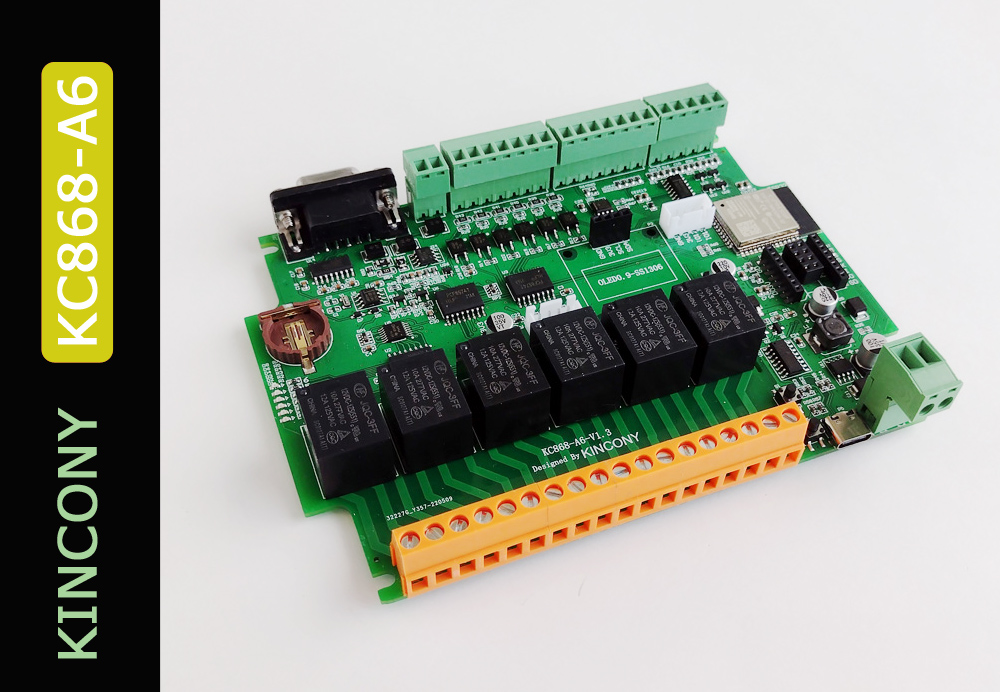
De KC868‑A6 is een veelzijdige controller die ideaal is voor irrigatieprojecten.
| Eigenschap | Beschrijving |
|---|---|
| MCU | ESP32 (WiFi + Bluetooth) |
| Relais | 6 kanalen, 10A, optisch geïsoleerd |
| Ingangen | 6 digitale ingangen (PCF8574) |
| Uitgangen | 8 digitale uitgangen (PCF8574) |
| I²C‑bus | Voor displays, sensoren, uitbreidingen |
| Voeding | 12V input, interne 5V/3.3V conversie |
| Extra’s | RS485, IR, RF, uitbreidingsheaders |
Meer info:
KC868‑A6 hardware details
💧 Irrigatiecontroller met ESPHome
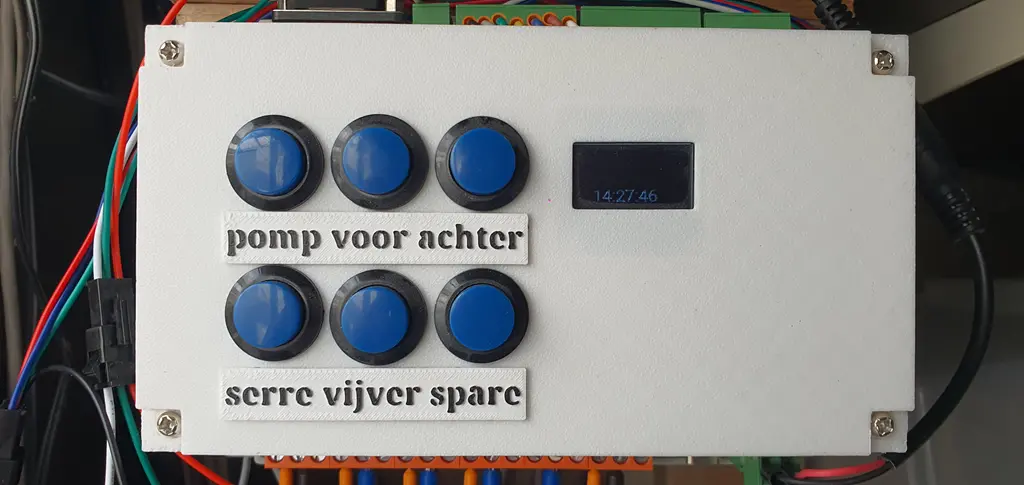
De configuratie bevat:
- 5 irrigatiezones
- pompbeveiliging
- OLED‑display
- lokale bediening via knoppen
- persistent “last run” geheugen
- Home Assistant integratie
⚡ Slimme automatisering: irrigeren op de goedkoopste uren
Met dynamische energieprijzen is het zonde om de pomp te laten draaien op dure uren. Daarom gebruik ik de cheapest_energy_hours.jinja template van TheFes.
Repo:
https://github.com/TheFes/cheapest-energy-hours
🧠 template sensor: “energy low 1 hour daytime”
# template sensor
- trigger:
    - platform: time
      at:
        - "8:00"
#        - "14:16"
    - platform: homeassistant
      event: start
  #  - platform: state
  #    entity_id:
  #          - binary_sensor.dishwasher_door
  #          - binary_sensor.dishwasher_remote_active
  sensor:
    - unique_id: f8853830-bf81-46d4-85a9-379c25c37c23
      name: Vijver bijvullen Start Time
      device_class: timestamp
      state: >
        {%- set sensor = 'zonneplan' -%}
        {% from "cheapest_energy_hours.jinja" import cheapest_energy_hours %}
        {{ cheapest_energy_hours(sensor=sensor, hours=1, start='8:00', end='17:00', include_tomorrow=false) }}
🧠 Automation: “Vijver bijvullen op goedkoopste uur”
alias: Lowest price vijver bijvullen
triggers:
  - trigger: time
    at: sensor.vijver_bijvullen_start_time

conditions:
  - condition: template
    value_template: >
      {{
        states('sensor.irrigation_vijver_laatst_gestart') not in ['unknown','unavailable','','Nog nooit']
        and
        (now() - (states('sensor.irrigation_vijver_laatst_gestart') | as_datetime | as_local)).total_seconds() > 18 * 3600
      }}

  - condition: numeric_state
    entity_id: sensor.cmx_temp
    above: 5

actions:
  - action: number.set_value
    target:
      entity_id: number.irrigation_vijver
    data:
      value: "7"

  - action: switch.turn_on
    target:
      entity_id: switch.vijver

mode: single
📄 Volledige ESPHome‑configuratie
Hieronder staat de volledige YAML‑configuratie van het irrigatiesysteem.
# Processing irrigation (board: nodemcuv2; framework: arduino; platform: platformio/espressif8266@3.2.0)
# --------------------------------------------------------------------------------
# HARDWARE: ESP8266 80MHz, 80KB RAM, 4MB Flash
# https://www.kincony.com/kc868-a6-hardware-design-details.html
# https://www.kincony.com/forum/showthread.php?tid=1963
# Based on ESPHome Sprinkler Controller - https://esphome.io/components/sprinkler.html
# https://community.home-assistant.io/t/sprinkler-automation-with-esphome-a-complete-project/565077
# Change Log
# 2023 01 XX
  # Initial version

# 2023 04 09 V03
  # fix run duration to seconds
# 2023 04 22 V04
  # fix GPIO order to match relay 1- 4
  # added % at the lambda return for progress sensor return value
# 2023 04 25 V05
  # added nodemcu as sensor to display in HA ui
  # added includes for api key en ota password
# 2023 05 07 V06
  # added a NTC temp sensor to  watch the enclosure temperature
# 2023 05 10 V07
  # addjusted settings reference voltage to adjust to actual temp (default 3.3)
# 2023 06 06 V08
  # adjusted settings for valves corresponding to switches
  # added repeat function
# 2024 04 04 V09
  # Corrected the value of KEY ESPHOME_PROJECT_VERSION due to compiling error esphome v2024.3.1
  # initializer-string for 'char [30]' is too long
  # changed 2023 06 06 V08 to 20240404_V09
  # removed the text "Irrigation Controller.,"
# 20260312_V01Peterpc
  # Wanneer laatst actief toegevoegd.
# 20260314_V01Peterpc
  # Bij reboot laatst actief weer naar HA sturen.


# Establish Substitutions
substitutions:
### Modify only the following lines.
  friendly_name: "Irrigation Controller"

  zone_1_name: Voortuin
  zone_1_last_run_id: voortuin_last_run

  zone_2_name: Achtertuin
  zone_2_last_run_id: achtertuin_last_run

  zone_3_name: Serre
  zone_3_last_run_id: serre_last_run

  zone_4_name: Vijver
  zone_4_last_run_id: vijver_last_run

  zone_5_name: Spare
  zone_5_last_run_id: zone5_last_run

##############################################
#  DO NOT CHANGE ANYTHING BELOW THIS LINE  ###
##############################################
  software_version: 20260314_V02Peterpc
  sensor_update_frequency: 1s
  log_level: debug
  # Enable levels logging https://esphome.io/components/logger.html
  # none, error, warn, info, debug (default), verbose, very_verbose
  zone_1_valve_id: valve_0
  zone_2_valve_id: valve_1
  zone_3_valve_id: valve_2
  zone_4_valve_id: valve_3
  zone_5_valve_id: valve_4
  esphome_name: irrigation
  esphome_platform: ESP32
  esphome_board: esp32dev
  esphome_comment: Five Valve Irrigation Controller
  esphome_project_name: jaya.Irrigation Controller
  esphome_project_version: $software_version
  devicename: irrigation_controller
  upper_devicename: "Irrigation Controller"
  uom: Min # this overrides the uom in sprinkler -> run_duration


#Define Project Deatils and ESP Board Type
esphome:
  name: $esphome_name
  comment: $esphome_comment
  project:
    name: $esphome_project_name
    version: $esphome_project_version
  on_boot:
    - priority: -100
      then:
        # Set default state for Valve Status
        - text_sensor.template.publish:
            id: valve_status
            state: "Idle"
        # Set multiplier to 60, convert seconds to minutes
        - sprinkler.set_multiplier:
            id: $devicename
            multiplier: 60
    - priority: -10
      then:
        - text_sensor.template.publish:
            id: ${zone_1_last_run_id}
            state: !lambda 'return id(zone1_last_run_global);'
        - text_sensor.template.publish:
            id: ${zone_2_last_run_id}
            state: !lambda 'return id(zone2_last_run_global);'
        - text_sensor.template.publish:
            id: ${zone_3_last_run_id}
            state: !lambda 'return id(zone3_last_run_global);'
        - text_sensor.template.publish:
            id: ${zone_4_last_run_id}
            state: !lambda 'return id(zone4_last_run_global);'
        - text_sensor.template.publish:
            id: ${zone_5_last_run_id}
            state: !lambda 'return id(zone5_last_run_global);'


esp32:
  board: $esphome_board
  framework:
    type: esp-idf
wifi:
  ssid: !secret wifi_ssid24
  password: !secret wifi_password
# Enable fallback hotspot (captive portal) in case wifi connection fails
  ap:
    ssid: "$esphome_name Fallback Hotspot"
    password: !secret esphome_ap_password

logger:
  level: ${log_level}
  logs:
    text_sensor: WARN

<<: !include common/ota.yaml

# Enable Web server.
web_server:
  port: 80

# Sync time with Home Assistant.
time:
  - platform: homeassistant
    id: homeassistant_time
###############################################
# restart device at 4 at night so if a wifi
# problem is there it will solve
###############################################
    on_time:
      - seconds: 0
        minutes: 0
        hours: 4
        days_of_week: MON-SUN
        then:
           - switch.toggle: restartit


###############################################
# Enable Home Assistant API
###############################################
api:
  encryption:
    key: !secret encryption_key
  reboot_timeout: 0s

###############################################
# store last run text sensors to flash
###############################################
globals:
  - id: zone1_last_run_global
    type: std::string
    restore_value: true
    initial_value: "\"Nog nooit\""

  - id: zone2_last_run_global
    type: std::string
    restore_value: true
    initial_value: "\"Nog nooit\""

  - id: zone3_last_run_global
    type: std::string
    restore_value: true
    initial_value: "\"Nog nooit\""

  - id: zone4_last_run_global
    type: std::string
    restore_value: true
    initial_value: "\"Nog nooit\""

  - id: zone5_last_run_global
    type: std::string
    restore_value: true
    initial_value: "\"Nog nooit\""


###############################################
# Text sensors with general information.
###############################################
text_sensor:
  - platform: version # Expose ESPHome version as sensor.
    name: $esphome_name ESPHome Version
    hide_timestamp: false
  - platform: wifi_info
    ip_address:
      name: "$esphome_name IP"
    ssid:
      name: "$esphome_name SSID"
    bssid:
      name: "$esphome_name BSSID"

# Expose Time Remaining as a sensor.
  - platform: template
    id: time_remaining
    name: $upper_devicename Time Remaining
    update_interval: $sensor_update_frequency
    icon: "mdi:timer-sand"
    lambda: |-
      int seconds = round(id($devicename).time_remaining_active_valve().value_or(0));
      int days = seconds / (24 * 3600);
      seconds = seconds % (24 * 3600);
      int hours = seconds / 3600;
      seconds = seconds % 3600;
      int minutes = seconds / 60;
      seconds = seconds % 60;

      std::string result;

      if (days > 0) result += std::to_string(days) + "d ";
      if (hours > 0) result += std::to_string(hours) + "h ";
      if (minutes > 0) result += std::to_string(minutes) + "m ";
      result += std::to_string(seconds) + "s";

      return result;

  # Expose Progress Percent as a sensor.
  - platform: template
    id: progress_percent
    name: $upper_devicename Progress %
    update_interval: $sensor_update_frequency
    icon: "mdi:progress-clock"
    lambda: |-
      int progress_percent = round(((id($devicename).valve_run_duration_adjusted(id($devicename).active_valve().value_or(0)) - id($devicename).time_remaining_active_valve().value_or(0)) * 100 / id($devicename).valve_run_duration_adjusted(id($devicename).active_valve().value_or(0))));
      std::string progress_percent_as_string = std::to_string(progress_percent);
      return progress_percent_as_string +"%";

  # Expose Valve Status as a sensor.
  - platform: template
    id: valve_status
    name: $upper_devicename Status
    update_interval: never
    icon: "mdi:information-variant"

  - platform: template # Expose the board type as a sensor
    id: espboard_type
    icon: "mdi:developer-board"
    name: $esphome_name ESPBoard
    lambda: |-
      return esphome::optional(std::string("${esphome_board}"));

  - platform: template
    id: ${zone_1_last_run_id}
    name: "$zone_1_name Laatst Gestart"
    icon: "mdi:clock-start"
    update_interval: never
    lambda: |-
      return id(zone1_last_run_global);

  - platform: template
    id: ${zone_2_last_run_id}
    name: "$zone_2_name Laatst Gestart"
    icon: "mdi:clock-start"
    update_interval: never
    lambda: |-
      return id(zone2_last_run_global);

  - platform: template
    id: ${zone_3_last_run_id}
    name: "$zone_3_name Laatst Gestart"
    icon: "mdi:clock-start"
    update_interval: never
    lambda: |-
      return id(zone3_last_run_global);

  - platform: template
    id: ${zone_4_last_run_id}
    name: "$zone_4_name Laatst Gestart"
    icon: "mdi:clock-start"
    update_interval: never
    lambda: |-
      return id(zone4_last_run_global);

  - platform: template
    id: ${zone_5_last_run_id}
    name: "$zone_5_name Laatst Gestart"
    icon: "mdi:clock-start"
    update_interval: never
    lambda: |-
      return id(zone5_last_run_global);


sensor:
  # Uptime sensor.
  - platform: uptime
    name: $upper_devicename Uptime

  # WiFi Signal sensor.
  - platform: wifi_signal
    name: $upper_devicename WiFi Signal
    update_interval: 60s

###############################################
# Configuration to set multiplier via number
###############################################
number:
  - platform: template
    id: $zone_1_valve_id
    name: $zone_1_name
    min_value: 0
    max_value: 60
    step: 1
    unit_of_measurement: $uom
    icon: "mdi:timer-outline"
    mode: box # Defines how the number should be displayed in the UI
    lambda: "return id($devicename).valve_run_duration(0);"
    set_action:
      - sprinkler.set_valve_run_duration:
          id: $devicename
          valve_number: 0
          run_duration: !lambda 'return x;'
  - platform: template
    id: $zone_2_valve_id
    name: $zone_2_name
    min_value: 1
    max_value: 60
    step: 1
    unit_of_measurement: $uom
    icon: "mdi:timer-outline"
    mode: box # Defines how the number should be displayed in the UI
    lambda: "return id($devicename).valve_run_duration(1);"
    set_action:
      - sprinkler.set_valve_run_duration:
          id: $devicename
          valve_number: 1
          run_duration: !lambda 'return x;'
  - platform: template
    id: $zone_3_valve_id
    name: $zone_3_name
    min_value: 1
    max_value: 60
    step: 1
    unit_of_measurement: $uom
    icon: "mdi:timer-outline"
    mode: box # Defines how the number should be displayed in the UI
    lambda: "return id($devicename).valve_run_duration(2);"
    set_action:
      - sprinkler.set_valve_run_duration:
          id: $devicename
          valve_number: 2
          run_duration: !lambda 'return x;'
  - platform: template
    id: $zone_4_valve_id
    name: $zone_4_name
    min_value: 1
    max_value: 60
    step: 1
    unit_of_measurement: $uom
    icon: "mdi:timer-outline"
    mode: box # Defines how the number should be displayed in the UI
    lambda: "return id($devicename).valve_run_duration(3);"
    set_action:
      - sprinkler.set_valve_run_duration:
          id: $devicename
          valve_number: 3
          run_duration: !lambda 'return x;'
  - platform: template
    id: $zone_5_valve_id
    name: $zone_5_name
    min_value: 1
    max_value: 60
    step: 1
    unit_of_measurement: $uom
    icon: "mdi:timer-outline"
    mode: box # Defines how the number should be displayed in the UI
    lambda: "return id($devicename).valve_run_duration(4);"
    set_action:
      - sprinkler.set_valve_run_duration:
          id: $devicename
          valve_number: 4
          run_duration: !lambda 'return x;'
  - platform: template
    id: sprinkler_ctrlr_repeat_cycles
    name: "Sprinkler Repeat Cycles"
    min_value: 0
    max_value: 4
    step: 1
    mode: box
    icon: "mdi:water-sync"
    lambda: "return id($devicename).repeat();"
    set_action:
      - sprinkler.set_repeat:
          id: $devicename
          repeat: !lambda 'return x;'

###############################################
# Main Sprinkler Controller
###############################################
sprinkler:
  - id: $devicename
    pump_start_pump_delay: 3s
    pump_stop_valve_delay: 3s
    main_switch:
      name: "Start/Stop/Resume"
      id: main_switch
    auto_advance_switch: "Auto Advance"
    valve_open_delay: 2s
    repeat_number: "Repeat"
    valves:
      - valve_switch: $zone_1_name
        enable_switch: Enable $zone_1_name
        pump_switch_id: sprinkler_pump_sw
        run_duration: 30s
        valve_switch_id: ${devicename}_1
      - valve_switch: $zone_2_name
        enable_switch: Enable $zone_2_name
        pump_switch_id: sprinkler_pump_sw
        run_duration: 3s
        valve_switch_id: ${devicename}_2
      - valve_switch: $zone_3_name
        enable_switch: Enable $zone_3_name
        pump_switch_id: sprinkler_pump_sw
        run_duration: 3s
        valve_switch_id: ${devicename}_3
      - valve_switch: $zone_4_name
        enable_switch: Enable $zone_4_name
        pump_switch_id: sprinkler_pump_sw
        run_duration: 7s
        valve_switch_id: ${devicename}_4
      - valve_switch: $zone_5_name
        enable_switch: Enable $zone_5_name
        pump_switch_id: sprinkler_pump_sw
        run_duration: 15s
        valve_switch_id: ${devicename}_5

button:
  - platform: template
    id: sprinkler_pause
    name: "Pause"
    icon: "mdi:pause"
    on_press:
      then:
        - text_sensor.template.publish:
            id: valve_status
            state: "Paused"
        - sprinkler.pause: $devicename

####################################################
# init i2c bus.
####################################################
i2c:
  sda: 4
  scl: 15
  scan: true
  id: bus_a

####################################################
# Fonts for display.
####################################################
font:
  - file: "common/fonts/Roboto-Regular.ttf"
    id: my_font
    size: 20
    bpp: 2

####################################################
# display
# https://esphome.io/components/display/ssd1306.html
####################################################
display:
  - platform: ssd1306_i2c
    i2c_id: bus_a
    model: "SSD1306 128x64"
    address: 0x3C
    #    lambda: |-
    #      it.print(0, 0, id(my_font), "Hello World!");

    #it.printf(0, 0, id(roboto), "T: %.1f°C", id(temperature).state);
    #it.printf(0, 20, id(roboto), "H: %.1f%%", id(humidity).state);
    #it.printf(0, 40, id(roboto), "AC:%.1fV", id(voltage_2).state);
    #      it.printf(0, 0, id(my_font), "Z1: %.1f", id(valve_status).state);
#      it.printf(0, 20, id(my_font), "Z2: %.1f", id(valve_1.state);
    lambda: |-
      if (id(${devicename}_1).state) {
        it.print(0, 0, id(my_font), "$zone_1_name: ON");
        it.printf(20, 20, id(my_font), "%s", id(time_remaining).state.c_str());
      } else {
        it.strftime(20, 40, id(my_font), "%H:%M:%S", id(homeassistant_time).now());
      }
      if (id(${devicename}_2).state) {
        it.print(0, 0, id(my_font), "$zone_2_name: ON");
        it.printf(20, 20, id(my_font), "%s", id(time_remaining).state.c_str());
      } else {
        it.print(0, 0, id(my_font), "");
      }
      if (id(${devicename}_3).state) {
        it.print(0, 0, id(my_font), "$zone_3_name: ON");
        it.printf(20, 20, id(my_font), "%s", id(time_remaining).state.c_str());
      } else {
        it.print(0, 0, id(my_font), "");
      }
      if (id(${devicename}_4).state) {
        it.print(0, 0, id(my_font), "$zone_4_name: ON");
        it.printf(20, 20, id(my_font), "%s", id(time_remaining).state.c_str());
      } else {
        it.print(0, 0, id(my_font), "");
      }
      if (id(${devicename}_5).state) {
        it.print(0, 0, id(my_font), "$zone_5_name: ON");
        it.printf(20, 20, id(my_font), "%s", id(time_remaining).state.c_str());
      } else {
        it.print(0, 0, id(my_font), "");
      }
 #     it.printf(0, 20, id(my_font), "%s", id(time_remaining).state.c_str());
 #     it.printf(0, 30, id(my_font), "Serre: %s", id(${devicename}_3).state ? "ON" : "OFF");
 #     it.printf(0, 45, id(my_font), "Vijver: %s", id(${devicename}_4).state ? "ON" : "OFF");
 #     it.printf(0, 0, id(my_font), "Voor: %s", id(${devicename}_1).state ? "ON" : "OFF");
 #     it.printf(0, 30, id(my_font), "Serre: %s", id(${devicename}_3).state ? "ON" : "OFF");

####################################################
# Initialize the channels for the KC868-A6 6 channel relay board.
####################################################
pcf8574:
  - id: "pcf8574_hub_out_1" # for output channel 1-8
    address: 0x24

  - id: "pcf8574_hub_in_1" # for input channel 1-8
    address: 0x22

####################################################
# Switch Control to restart the irrigation system.
####################################################
switch:
  - platform: restart
    name: "Restart $devicename"
    id: restartit

# Switch for the NTC https://esphome.io/components/sensor/ntc.html, Prevent self heating by switching the voltage on a GPIO
##  - platform: gpio
##    pin:
##      number: GPIO5 # Pin D1
##      inverted: false
##    id: ntc_vcc

####################################################
# Hidden I/O  Switches to control irrigation valve relays
####################################################
  - platform: gpio
    name: Relay Board Pin IN1
    restore_mode: RESTORE_DEFAULT_OFF # Prevents GPIO pin from going high during boot
    internal: true # Prevents GPIO switch NAME from showing up in Home Assistant
    id: ${devicename}_1
    on_turn_on:
      - lambda: |-
          id(zone1_last_run_global) = id(homeassistant_time).now().strftime("%Y-%m-%d %H:%M:%S");
      - text_sensor.template.publish:
          id: ${zone_1_last_run_id}
          state: !lambda 'return id(zone1_last_run_global);'
      - text_sensor.template.publish:
          id: valve_status
          state: "$zone_1_name Active"
    on_turn_off:
      - text_sensor.template.publish:
          id: valve_status
          state: "Idle"
    pin:
      pcf8574: pcf8574_hub_out_1 # D5
      number: 0
      mode: OUTPUT
      inverted: true


  - platform: gpio
    name: Relay Board Pin IN2
    restore_mode: RESTORE_DEFAULT_OFF # Prevents GPIO pin from going high during boot
    internal: true # Prevents GPIO switch NAME from showing up in Home Assistant
    id: ${devicename}_2
    on_turn_on:
      - lambda: |-
          id(zone2_last_run_global) = id(homeassistant_time).now().strftime("%Y-%m-%d %H:%M:%S");
      - text_sensor.template.publish:
          id: ${zone_2_last_run_id}
          state: !lambda 'return id(zone2_last_run_global);'

      - text_sensor.template.publish:
          id: valve_status
          state: "$zone_2_name Active"
    on_turn_off:
      - text_sensor.template.publish:
          id: valve_status
          state: "Idle"
    pin:
      pcf8574: pcf8574_hub_out_1 # D6
      number: 1
      mode: OUTPUT
    inverted: true
  - platform: gpio
    name: Relay Board Pin IN3
    restore_mode: RESTORE_DEFAULT_OFF # Prevents GPIO pin from going high during boot
    internal: true # Prevents GPIO switch NAME from showing up in Home Assistant
    id: ${devicename}_3
    on_turn_on:
      - lambda: |-
          id(zone3_last_run_global) = id(homeassistant_time).now().strftime("%Y-%m-%d %H:%M:%S");
      - text_sensor.template.publish:
          id: ${zone_3_last_run_id}
          state: !lambda 'return id(zone3_last_run_global);'
      - text_sensor.template.publish:
          id: valve_status
          state: "$zone_3_name Active"
    on_turn_off:
      - text_sensor.template.publish:
          id: valve_status
          state: "Idle"
    pin:
      pcf8574: pcf8574_hub_out_1 # D7
      number: 2
      mode: OUTPUT
      inverted: true
  - platform: gpio
    name: Relay Board Pin IN4
    restore_mode: RESTORE_DEFAULT_OFF
    internal: true
    id: ${devicename}_4
    on_turn_on:
      - lambda: |-
          id(zone4_last_run_global) = id(homeassistant_time).now().strftime("%Y-%m-%d %H:%M:%S");
      - text_sensor.template.publish:
          id: ${zone_4_last_run_id}
          state: !lambda 'return id(zone4_last_run_global);'
      - text_sensor.template.publish:
          id: valve_status
          state: "$zone_4_name Active"
    on_turn_off:
      - text_sensor.template.publish:
          id: valve_status
          state: "Idle"
    pin:
      pcf8574: pcf8574_hub_out_1
      number: 3
      mode: OUTPUT
      inverted: true

  - platform: gpio
    name: Relay Board Pin IN5
    restore_mode: RESTORE_DEFAULT_OFF # Prevents GPIO pin from going high during boot
    internal: true # Prevents GPIO switch NAME from showing up in Home Assistant
    id: ${devicename}_5
    on_turn_on:
      - lambda: |-
          id(zone5_last_run_global) = id(homeassistant_time).now().strftime("%Y-%m-%d %H:%M:%S");
      - text_sensor.template.publish:
          id: ${zone_5_last_run_id}
          state: !lambda 'return id(zone5_last_run_global);'
      - text_sensor.template.publish:
          id: valve_status
          state: "$zone_5_name Active"
    on_turn_off:
      - text_sensor.template.publish:
          id: valve_status
          state: "Idle"
    pin:
      pcf8574: pcf8574_hub_out_1 # D8
      number: 4
      mode: OUTPUT
    inverted: true
  - platform: gpio
    name: Relay Board Pin IN6
    restore_mode: RESTORE_DEFAULT_OFF # Prevents GPIO pin from going high during boot
    internal: true # Prevents GPIO switch NAME from showing up in Home Assistant
    id: sprinkler_pump_sw
    on_turn_on:
      - text_sensor.template.publish:
          id: valve_status
          state: "Pump Active"
    on_turn_off:
      - text_sensor.template.publish:
          id: valve_status
          state: "Idle"
    pin:
      pcf8574: pcf8574_hub_out_1 # D8
      number: 5
      mode: OUTPUT
    inverted: true
###############################################
# Binary Sensor.
###############################################
binary_sensor:
  - platform: homeassistant
    # prevent deep sleep - Needs further investigation on usefullness
    id: prevent_deep_sleep
    name: "$upper_devicename Prevent Deep Sleep"
    entity_id: input_boolean.prevent_deep_sleep
################################################################
# Hidden I/O  inputs to control irrigation valve relays localy #
################################################################
  - platform: gpio
    name: "a6-input1"
    internal: true # Prevents GPIO switch NAME from showing up in Home Assistant
    on_press:
      then:
        - sprinkler.start_single_valve:
            id: $devicename
            valve_number: 0
    pin:
      pcf8574: pcf8574_hub_in_1 # D7
      number: 0
      mode: INPUT
      inverted: true
  - platform: gpio
    name: "a6-input2"
    internal: true # Prevents GPIO switch NAME from showing up in Home Assistant
    on_press:
      then:
        - sprinkler.start_single_valve:
            id: $devicename
            valve_number: 1
    pin:
      pcf8574: pcf8574_hub_in_1 # D7
      number: 1
      mode: INPUT
      inverted: true
  - platform: gpio
    name: "a6-input3"
    internal: true # Prevents GPIO switch NAME from showing up in Home Assistant
    on_press:
      then:
        - sprinkler.start_single_valve:
            id: $devicename
            valve_number: 2
    pin:
      pcf8574: pcf8574_hub_in_1 # D7
      number: 2
      mode: INPUT
      inverted: true
  - platform: gpio
    name: "a6-input4"
    internal: true # Prevents GPIO switch NAME from showing up in Home Assistant
    on_press:
      then:
        - sprinkler.start_single_valve:
            id: $devicename
            valve_number: 3
    pin:
      pcf8574: pcf8574_hub_in_1 # D7
      number: 3
      mode: INPUT
      inverted: true
  - platform: gpio
    name: "a6-input5"
    internal: true # Prevents GPIO switch NAME from showing up in Home Assistant
    on_press:
      then:
        - sprinkler.start_single_valve:
            id: $devicename
            valve_number: 4
    pin:
      pcf8574: pcf8574_hub_in_1 # D7
      number: 4
      mode: INPUT
      inverted: true
  - platform: gpio
    name: "a6-input6"
    internal: true # Prevents GPIO switch NAME from showing up in Home Assistant
    on_press:
      then:
        - sprinkler.shutdown: $devicename
    pin:
      pcf8574: pcf8574_hub_in_1 # D7
      number: 5
      mode: INPUT
      inverted: true
# -----------------------------end---------------------------------------------------
🎯 Conclusie
Dit project combineert krachtige hardware, flexibele software en slimme automatisering. Het resultaat is een irrigatiesysteem dat volledig autonoom werkt, energie bespaart en perfect integreert in een moderne smart home‑omgeving.
